NVIDIA Shakes Wall Street. Is This a Warning Sign?
This past week’s market action is a classic reminder of why nobody, not even AI agents, can predict what the market will do next. After all, who could have seen the Jensen Huang news coming?
Investors were intently focused on the enormous capex pouring into AI infrastructure and data center buildouts. Then came an unexpected twist that had little to do with spending. Human behavior caused a big shift in investor sentiment and sent shock waves through an already nervous market. This shows that, when stock valuations are stretched, any negative news can trigger a major selloff.
This week’s update:
- Earnings and IPOs
- Setting up StyleButtons
- Our upcoming special sale
In last week’s newsletter, I questioned whether the AI bubble had burst. After this week’s developments, we may be a little closer to an answer. The news surrounding NVIDIA’s CEO rattled investors, sending the stock lower and dragging other AI-related stocks with it. Was this the beginning of something bigger? In my view, the news may have let some air out of the AI bubble rather than causing it to burst outright. The next few weeks could reveal more.
Earnings and IPOs
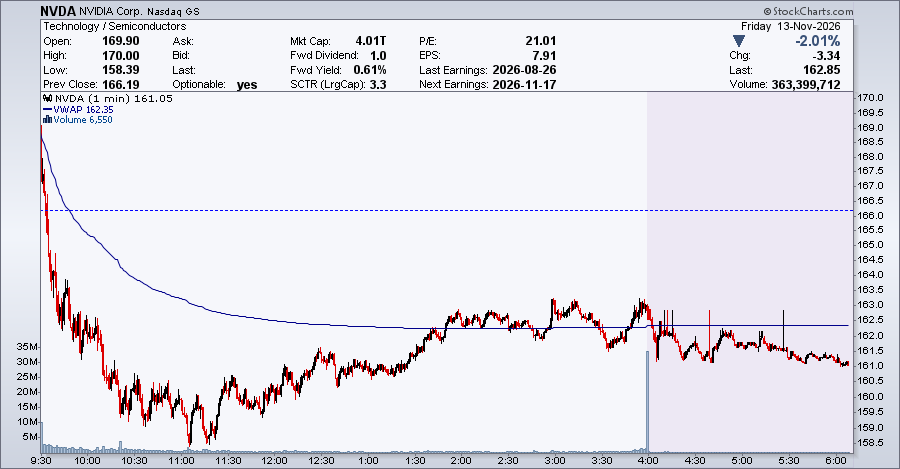
Next week’s NVIDIA earnings may shed more light on the company’s future and the overall AI landscape. The earnings call is on Tuesday after the close, so you’ll want to keep an eye on how the stock trades in the extended-hours session.
Here’s a quick tip for following the action. To view an intraday chart, go to Settings and make sure the Extended Hours box is checked. Then, select an intraday time frame and a one- or two-day range. You can also click the chart below and save it to your ChartList. Better yet, create an Intraday StyleButton using a ChartStyle that fits your needs. That way, you’ll have your preferred chart settings ready whenever you need them.
Setting up StyleButtons
Speaking of StyleButtons, this is a great time to view our most recent New User webinar, especially if you haven’t watched it yet. At the 1:04:33 mark, Grayson Roze walks through how to set up StyleButtons. Once you’ve created them, switching between daily, weekly, monthly, and intraday charts becomes a breeze, with no need to adjust your chart settings every time you want to view a different timeframe.
Even if you’ve been a StockCharts subscriber for years, I’d encourage you to watch the entire webinar. You may pick up a few tips and tricks that make your charting routine more efficient. With so much happening in the market, anything that helps you analyze charts faster is worth the effort.
NVIDIA earnings aren’t the only event next week. There’s plenty of anticipation surrounding Anthropic’s potential IPO, which could add more context to investors’ perception of AI. We may not know how the market will react to these events, but one thing we do know is that during NVIDIA’s earnings call, the leather-jacket-clad Jensen Huang will be noticeably absent.
Heads up… something special is coming!
There’s a good chance the stock market will be volatile as we head into year-end. With the holidays around the corner, it’s easy to get distracted. The last thing you want is to be caught off guard by a sudden market move. That’s why having the right tools and a consistent routine makes a difference.
So here’s something to look forward to.
Our Cyber Monday sale is on November 30, and November 30 only. We’re giving you an early heads-up so you don’t miss out. Keep an eye on your inbox for a special early access announcement. You’ll want to be among the first to hear about it!
Enjoy your weekend!