StockCharts Insider: When the Screener Isn't Enough, Convert to Scan
Before We Dive In…
StockCharts’ Screener is built for convenience and speed. Simple and straightforward. You’ve got a thesis. You stack indicators. Layers upon layers. You plug it in, results come in fast. You’re in discovery mode.
But something’s missing. The presets don’t seem to match your strategy.
This is when you need to hit Convert to Scan. The ‘borrowed logic’ was good, but you’re in the fine-tuning phase now. You take what the Screener gave you and now you tweak it to bring it closer to what you really need.
Customizing the Filters to Match Your Unique Approach
The Screener’s filters give you a wide range of presets. For example, the SCTR gives you Above 20, Above 40, Above 60, Above 80, Above 90. RSI gives you levels and fixed ranges. On their own, they work quite well, as they capture a general range. And that’s often good enough for most strategies.
But if you need something that’s not on the menu, that will requires a tweak or two. Seems simple, but it’s beyond the Screener’s capabilities. Customizing past this limit is what Convert to Scan is for. Let’s take a look.
The Off-the-Shelf Version
Say you've built a combo like this:
Group: S&P 500 + SCTR above 60 + Above Ichimoku Cloud + RSI(14) between 50 and 70 + EPS Growth (YoY) over 15% + Revenue Growth (YoY) over 10% + Net Profit Margin over 10%
It’s a solid screen. SCTR above 60 for technical strength, Ichimoku Cloud for trend confirmation, RSI 50–70 for bullish-but-not-overbought momentum, and three fundamental criteria to filter for stocks exhibiting real growth and decent profits.
But it’s still slightly off. An SCTR above 60 is too low. Above 80, the next menu choice, is too high. You are targeting 76 instead. But it’s not on the list. Same with the RSI range. A 50 and 70 range is good, but you’d prefer 45 to 70 instead. Now what?
This is where you hit Convert to Scan. It’s at the bottom left of the Screener (see below). Notice the blue button? You would hit that button only once your Screener criteria are all set.
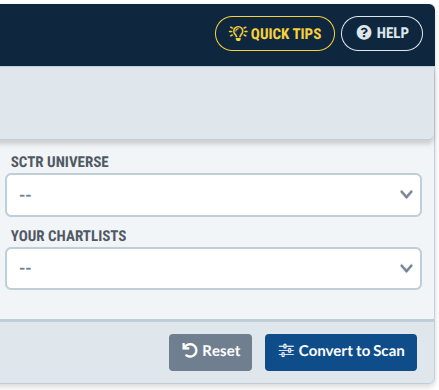
The Screener Customized to Your Strategy
The Screener’s filters don’t give you the in-betweens you’re looking for. Convert to Scan allows you to customize the filters to match your approach.
Here’s what it looks like before making the changes:
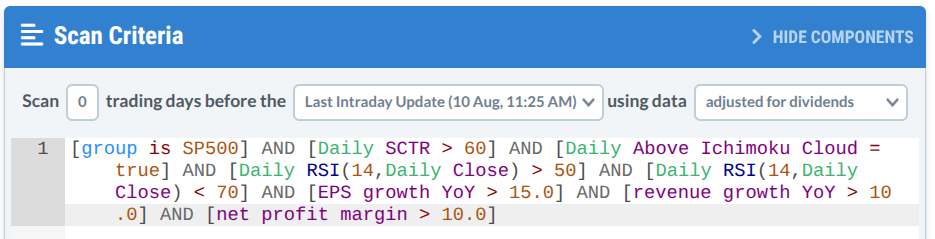
Now you simply go in and make the tweaks:
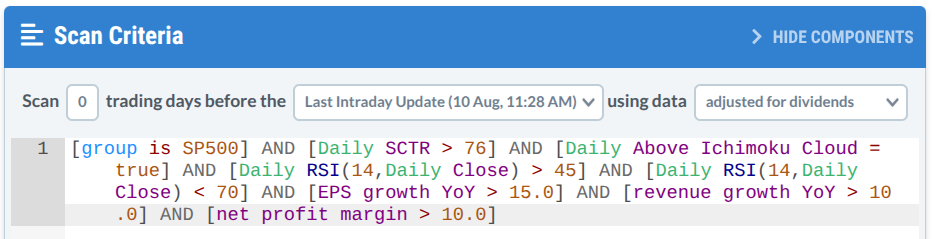
See what I did? The only difference is two numbers: 60 became 76 in the SCTR, 50 became 45 in the RSI range. Through the scan panel, you’re building a search that’s specific to your own criteria.
Reading the Syntax
Reading the syntax can seem intimidating, so we'll break it down the way you’d read a sentence. Go one clause at a time:
- [group is SP500]: That’s your stock universe (S&P 500 stocks).
- [Daily SCTR > 76]: Technical strength, dialed to a given preference (in this case, above 76).
- [Daily Above Ichimoku Cloud = true]: The stock must be above cloud support (again, this is one of my personal preferences).
- [Daily RSI(14,Daily Close) > 45] AND [Daily RSI(14,Daily Close) < 70]: This is how I altered the bullish range preset (45 instead of 50).
Convert to Scan builds this out for you. That’s a real plus. Otherwise, you’d have to use the AI Chat Assistant or build the syntax from scratch.
Insider Tip #1: Know When Your Strategy Has Outgrown the Presets
If the presets match your strategy, there's no reason to convert. The Screener is fast, and fast has a real advantage when you need to iterate several scenarios or ideas. In this case, you’d use Convert to Scan only when you find yourself hesitating between two presets, wishing for an in-between. If you absolutely need a specific number or metric that isn’t available, then that, too, would require a more comprehensive scan rather than a Screener.
Insider Tip #2: Overly-Tight Parameters Leading to Good Results Might Not Work in Future Scans
Once you begin hand-picking numbers, it's easy to keep adjusting until your scan looks flawless. 76 becomes 75, then 74, 71, or 69, etc. You pick the one that gives you the best results now. But that's no longer customization. That's overfitting, a concept borrowed from trading system backtesting. Still, the same trap applies. Watch out for scans tuned too tightly to today's market. They may limit you from finding good results tomorrow.
And That's a Wrap
Screens and scans are two different tools and approaches to find stocks. But with Convert to Scan, they become two stages of the same process. The Screener gives you speed and convenience. Convert to Scan allows you to develop and customize the criteria beyond the presets. Most of the time, the presets fit fine. But when they don't, well, now you know what to do.